

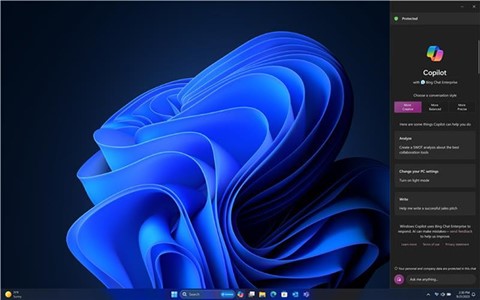
Microsoft has unveiled its new AI companion, Copilot, with the Windows version rolling out on September 26, and the Microsoft 365 Copilot for enterprise customers becoming available on 1st of November 2023.
This AI companion is integrated across multiple Microsoft platforms including Bing, Edge, Microsoft 365, and Windows, providing a seamless user experience.
The vision is to create a single Copilot user experience across all these platforms.

New Visual Identity and User Experience
A new visual identity has been introduced for Copilot, symbolized by the Copilot icon. The aim is to provide a consistent user experience across all Copilots.
- How does this help: For instance, a user working on multiple devices and applications will find the Copilot icon familiar, making it easier to access Copilot features without having to re-learn the interface.
- Why it matters: This consistency reduces the learning curve for users, making it easier to utilize Copilot’s features across various applications and devices.
Product Line-up for Commercial Customers
- Microsoft Copilot in Windows: This version of Copilot is designed to help users create faster and complete tasks with ease. It’s accessible via the taskbar or with the Win+C keyboard shortcut, providing assistance alongside all apps. This version will feature the new Copilot icon, the new Copilot user experience, Bing Chat, and will be available to commercial customers for free.
- How does this help: For example, a user working on a report can quickly access Copilot to find relevant data or get suggestions on formatting, enhancing productivity.
- Why it matters: Having an AI assistant readily available can significantly improve workflow.
- Bing Chat Enterprise: This version builds on Microsoft Copilot and adds commercial data protection to ensure business data remains secure.
- How does this help: For instance, a financial analyst can use Bing Chat Enterprise to pull up recent market trends while ensuring the data remains secure within the enterprise environment.
- Why it matters: This version addresses the concern of protecting sensitive business data while aiding in productivity.
- Microsoft 365 Copilot: This is an AI assistant at work, building on Bing Chat Enterprise but offering a class of its own with enterprise-grade security, privacy, compliance, and responsible AI. It includes a new feature called Microsoft 365 Chat which goes beyond simple Q&A, combing through all your data to solve complex problems at work. It’s integrated into various Microsoft 365 Apps.
- How does this help: For example, a project manager could use Microsoft 365 Copilot to sift through large amounts of project data to identify bottlenecks and optimize resource allocation.
- Why it matters: This version adheres to high standards of security and compliance which is essential for enterprise customers.
Additional Features and Enhancements
- Copilot Lab: A new feature to help users learn to work iteratively with AI and get the most out of Microsoft 365 Copilot. It will be integrated into Microsoft 365 Copilot and accessible via a website to all Microsoft 365 Copilot users.
- How does this help: For instance, a marketing professional can use Copilot Lab to learn how to automate routine data analysis tasks, freeing up more time for strategic planning.
- Why it matters: Copilot Lab facilitates the learning process of effectively utilizing AI.
- Enhancements in Microsoft 365 Apps: New Copilot experiences are being added in Microsoft 365 apps like Outlook, Word, Excel, Loop, OneNote, Stream, and OneDrive to help users stay organized, prepared, and ready to take action.
- How does this help: For instance, a user can leverage Copilot in Microsoft Word to draft and edit documents more efficiently by using AI-powered suggestions and corrections.
- Why it matters: These enhancements can significantly improve productivity and user satisfaction.
Example in MS Word: - Request a summary of any document from Copilot for a quick recap or to swiftly grasp the content, and Copilot will now provide a detailed bulleted summary encompassing all the essential information.
- Instruct Copilot to “rewrite” a paragraph, then browse through a variety of alternatives to find the perfect fit. You can then tweak the tone of the rewrite to make it neutral, casual, or professional.
- Sharpen a prompt by directing Copilot to actions like “make answer more concise” or “add a column in the table for the project owner.”
- Bypass the hassle of formatting by asking Copilot to convert your text into a table.

- Bing Chat Enterprise Updates: Now available in the Microsoft Edge mobile app with support for multimodal visual search and Image Creator to boost creativity at work while protecting sensitive enterprise data.
- How does this help: For example, a designer can use the Image Creator feature to quickly generate visuals for a presentation while on the move.
- Why it matters: These updates cater to the need for productive tools accessible anywhere, anytime.
- Copilot in Windows Updates: This update empowers users to create faster, complete tasks with ease, and lessens cognitive load. IT admins are provided with controls to decide when to deploy Copilot in Windows to their enterprise and who has access.
- How does this help: For instance, IT admins can choose to deploy Copilot during a less busy period to ensure a smooth transition and better adoption among employees.
- Why it matters: Tailoring the deployment of new tools to the specific needs and policies of an organization is crucial for successful implementation and user adoption.
Responsible AI and Copilot Copyright Commitment
As Copilot is brought to customers, Microsoft is guided by its AI principles, Responsible AI Standard, and Copilot Copyright Commitment to ensure customers can use Copilot services and the output they generate without worrying about copyright.
Learn More
For more details about today’s Copilot announcements, you can visit the Official Microsoft Blog and the Microsoft 365 Blog.